+92306 3026 466
What Is Technical SEO? A Beginner’s Checklist (2026 Guide)
Summarize this post
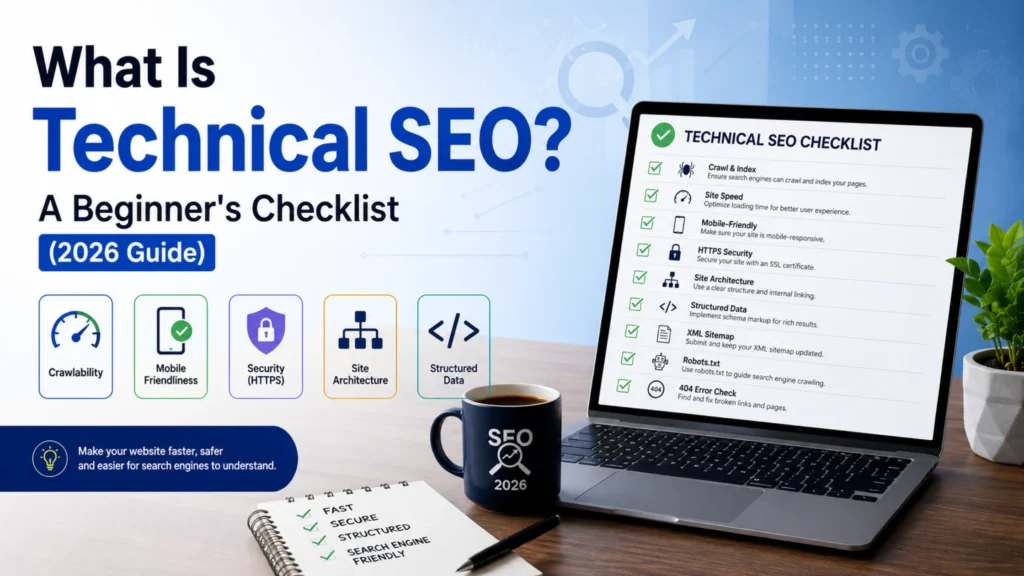
Technical SEO is the process of optimizing your website’s backend structure including site speed, mobile-friendliness, crawlability, indexability, and security, so search engines can find, understand, and rank your pages properly. It’s different from on-page SEO (content, keywords) and off-page SEO (backlinks), focusing instead on how easily search engine bots can access and interpret your site. A basic technical SEO checklist includes fixing crawl errors, submitting an XML sitemap, enabling HTTPS, improving Core Web Vitals, using structured data, and eliminating duplicate content.
If you’ve ever published a well-written page that still doesn’t rank, the problem usually isn’t your content, it’s your website’s technical foundation. At CodeFyze, we’ve seen countless beginners pour hours into blog writing while ignoring the technical side that actually determines whether Google can crawl and rank that content in the first place.
This guide breaks down technical SEO in plain, beginner-friendly language, with a practical checklist you can start using today.
What Is Technical SEO?
Technical SEO refers to the non-content optimizations that help search engines like Google, Bing, and AI-driven search tools (like Google’s AI Overview) access, crawl, render, and index your website efficiently.
Think of it this way: great content is the “what” of your website, but technical SEO is the “how” how easily a search engine robot can navigate, read, and trust your site.
Unlike on-page SEO (keywords, headings, content) or off-page SEO (backlinks, mentions), technical SEO works quietly in the background. But without it, even the best content can remain invisible in search results.
Why Technical SEO Matters for Beginners
Many beginners assume SEO starts and ends with keywords. In reality, search engines use crawlers (bots) to scan your website’s code and structure. If those crawlers hit broken links, slow-loading pages, or blocked resources, they may skip indexing your content entirely.
Here’s what good technical SEO enables:
- Faster crawling and indexing of new pages.
- Better rankings due to improved user experience signals.
- Higher chances of appearing in Google’s AI Overview and featured snippets.
- Reduced bounce rates from faster, mobile-friendly pages.
- Stronger trust signals through security and site architecture.
The Complete Technical SEO Checklist for Beginners
1. Ensure Your Site Is Crawlable
Search engines can only rank pages they can access. Start here:
- Check your robots.txt file to make sure important pages aren’t accidentally blocked.
- Review crawl errors in Google Search Console.
- Fix broken internal links (404 errors).
- Avoid orphan pages, pages with no internal links pointing to them.
2. Submit and Optimize Your XML Sitemap
An XML sitemap acts as a roadmap for search engines, listing all the pages you want indexed.
- Generate a sitemap using your CMS (WordPress, Shopify, etc.) or a tool.
- Submit it via Google Search Console and Bing Webmaster Tools.
- Keep it updated automatically as you add new pages.
- Remove non-essential pages (like tag archives or thank-you pages).
3. Improve Website Speed and Core Web Vitals
Page speed is a confirmed ranking factor and directly affects user experience. Focus on Google’s Core Web Vitals:
- Largest Contentful Paint (LCP): How fast the main content loads.
- Interaction to Next Paint (INP): How responsive your site feels.
- Cumulative Layout Shift (CLS): Visual stability while loading.
Quick wins: compress images, enable browser caching, use a Content Delivery Network (CDN), and minimize unused JavaScript and CSS.
4. Make Your Website Mobile-Friendly
Google uses mobile-first indexing, meaning it primarily evaluates the mobile version of your site for ranking.
- Use responsive design that adapts to all screen sizes.
- Test your site using Google’s Mobile-Friendly Test.
- Avoid intrusive pop-ups that block content on mobile.
5. Secure Your Website with HTTPS
HTTPS encrypts data between your website and visitors, and it’s a trust signal for both users and search engines.
- Install an SSL certificate.
- Redirect all HTTP URLs to HTTPS.
- Fix “mixed content” warnings (HTTP resources loaded on HTTPS pages).
6. Fix Duplicate Content and Canonicalization
Duplicate content confuses search engines about which page to rank.
- Use canonical tags to indicate the preferred version of a page.
- Avoid duplicate content from URL parameters, printer-friendly pages, or www/non-www versions.
- Consolidate similar pages instead of creating near duplicates.
7. Optimize URL Structure
Clean, descriptive URLs help both users and search engines understand page content.
- Keep URLs short and readable (e.g.,
/technical-seo-checklistinstead of/p=12345) - Use hyphens, not underscores, to separate words.
- Avoid unnecessary parameters and session IDs.
8. Implement Structured Data (Schema Markup)
Structured data helps search engines understand the context of your content, not just the words, but the entities and relationships behind them. This is increasingly important as AI Overview and other AI-driven search features rely heavily on structured, entity-based understanding.
- Add Schema markup for articles, FAQs, breadcrumbs, products, or reviews.
- Test implementation using Google’s Rich Results Test.
- Use JSON-LD format, which Google recommends.
9. Create a Logical Site Architecture
A clear website structure helps search engines understand topical relationships between pages.
- Use a shallow hierarchy (homepage → category → subpage) within 3 clicks.
- Build topic clusters linking related content together.
- Use descriptive anchor text for internal links.
10. Optimize for Crawl Budget (For Larger Sites)
If you run a larger website, search engines allocate a limited “crawl budget” to your site.
- Remove or noindex low-value pages (thin content, duplicate filters).
- Fix redirect chains and loops.
- Regularly audit and remove unnecessary pages.
11. Add an XML Image Sitemap and Optimize Images
Images contribute to both page speed and search visibility.
- Use descriptive, keyword-relevant file names.
- Add alt text for accessibility and image search visibility.
- Compress images without sacrificing quality (WebP format recommended).
12. Monitor with the Right Tools
Consistent monitoring prevents small technical issues from becoming major ranking problems.
- Google Search Console: Crawl errors, indexing status, Core Web Vitals.
- Google Analytics: User behavior and engagement.
- Screaming Frog or Sitebulb: Full technical site audits.
- PageSpeed Insights: Performance diagnostics.
How Technical SEO Connects to E-E-A-T
Google’s E-E-A-T framework (Experience, Expertise, Authoritativeness, Trustworthiness) isn’t just about content quality, technical factors reinforce trust signals too. A secure (HTTPS), fast, well-structured, and error-free website tells both users and search engines that a site is credible and professionally maintained. This is something the team at CodeFyze prioritizes for every client audit, since technical health directly supports content credibility.
Common Technical SEO Mistakes Beginners Make
- Ignoring mobile performance while focusing only on desktop
- Blocking important pages via robots.txt by mistake
- Not fixing broken redirects after a website migration
- Overlooking duplicate content from URL variations
- Skipping structured data entirely
Final Thoughts
Technical SEO might sound intimidating at first, but it’s really about removing barriers between your content and the search engines trying to understand it. Start with the basics, crawlability, speed, mobile-friendliness, and security then move on to structured data and site architecture as your site grows.
At CodeFyze, we recommend beginners run a full technical audit every 2–3 months to catch new issues early, especially after adding new pages or making design changes. A technically healthy website isn’t just easier to rank, it’s easier for real users to trust and use.
On this page
Related Topics
< FAQS >
No Confusion. Just Clarity.
Get quick, clear answers to everything you need to know about working with us.
- What is technical SEO in simple words?
Technical SEO is the process of optimizing a website’s technical foundation so search engines can crawl, index, and rank it efficiently. It includes improving site speed, mobile-friendliness, security, and overall website structure.
- What is the difference between technical SEO and on-page SEO?
Technical SEO improves how a website functions, including crawlability, site speed, security, and schema markup. On-page SEO focuses on optimizing content, keywords, headings, and meta tags. Both are essential for better search rankings.
- What are the basics of technical SEO for beginners?
The basics of technical SEO include using HTTPS, submitting an XML sitemap, improving Core Web Vitals, fixing crawl errors, eliminating duplicate content, and ensuring your website is mobile-friendly. These steps help search engines index your site correctly.
- How do I check my website's technical SEO?
You can check your website’s technical SEO using Google Search Console, Google PageSpeed Insights, and Screaming Frog. These tools identify crawl errors, indexing issues, Core Web Vitals, and other technical problems that may affect rankings.
- Is technical SEO hard to learn?
No. The basics of technical SEO are easy to learn with the right tools and guidance. Platforms like WordPress simplify many tasks, and agencies like CodeFyze help businesses implement technical SEO best practices without requiring advanced coding skills.
- How often should I do a technical SEO audit?
A technical SEO audit should be performed every 2–3 months, or after major website updates, redesigns, or migrations. Regular audits help identify and fix issues before they impact search engine rankings.

Related Blog Posts
Competitor Backlink Analysis: How to Find and Replicate Your Competitor’s Best Links
Competitor backlink analysis is the process of studying where your competitors get their backlinks from…

CodeFyze
July 30, 2026
Citation Building vs Backlink Building: What’s the Difference and Why You Need Both
Citation building involves listing your business’s name, address, and phone number (NAP) consistently across online…
CodeFyze
July 29, 2026

HARO/Journalist Outreach: Getting Backlinks from News and Media Sites
HARO link building is the process of earning high-authority backlinks by responding to journalist queries…
CodeFyze
July 29, 2026
Questions? Reach us on Whatsapp +971 55 265 4401 Or Email info@codefyze.com
Questions? Reach us on Whatsapp +44 798 504 1813 Or Email info@codefyze.com
< recent blogs >
Latest Insights & Articles
Explore our latest articles, tips, and insights all in one place.
#BacklinkAnalysis, #CodeFyze, #CompetitorSEO, #DigitalMarketing, #LinkBuilding, #OffPageSEO, #SemrushSEO, #SEOStrategy, #SEOTools
Competitor Backlink Analysis: How to Find and Replicate Your Competitor’s Best Links
Competitor backlink analysis is the process of studying where your competitors get their backlinks from…
CodeFyze
July 30, 2026
#BacklinkBuilding, #CitationBuilding, #CodeFyze, #DigitalMarketing, #GoogleBusinessProfile, #LocalSEO, #NAPCitations, #SEOStrategy
Citation Building vs Backlink Building: What’s the Difference and Why You Need Both
Citation building involves listing your business’s name, address, and phone number (NAP) consistently across online…
CodeFyze
July 29, 2026
#BacklinkStrategy, #CodeFyze, #ContentMarketing, #DigitalPR, #EEAT, #HARO, #JournalistOutreach, #LinkBuilding
HARO/Journalist Outreach: Getting Backlinks from News and Media Sites
HARO link building is the process of earning high-authority backlinks by responding to journalist queries…
CodeFyze
July 29, 2026